API Security Testing: 10 Things Every Beginner Must Know

Learn API security testing from scratch. Covers the OWASP API Top 10, common API vulnerabilities like BOLA and broken authentication, hands-on tools like Burp Suite, and how to start finding real bugs.
- Offense
- Pentesting
- Skills
- Api Security
- Bug Bounty
Key facts
- BOLA (Broken Object Level Authorization) has held the number one position on the OWASP API Security Top 10 since the list was first published in 2019 and retained it in the 2023 update
- The OWASP API Security Top 10 was updated in 2023 to replace categories like Excessive Data Exposure and Mass Assignment with Broken Object Property Level Authorization and add new categories including Unrestricted Access to Sensitive Business Flows and Server Side Request Forgery
- According to Salt Security's 2024 State of API Security report, API attacks increased 400% in the six months prior to the report, with authorization vulnerabilities accounting for the majority of critical findings
- Burp Suite is used by over 70,000 organizations for web application security testing and is the most common tool listed in penetration testing job postings according to CyberSeek
- crAPI (Completely Ridiculous API) is an OWASP project specifically designed for learning API security testing, containing intentional vulnerabilities mapped to the OWASP API Top 10
APIs power almost every modern application. When you open a mobile app, check your bank balance, order food, or update your profile, an API is working in the background. The website is the part you see. The API is the part that sends, receives, and processes the data.
This is also why APIs are one of the most important targets for security testing. A website may look secure from the outside, but the API behind it may still expose private data, leading to a data breach, or accept actions from the wrong user. Many serious API bugs are not found through complex payloads. They are found by carefully reading requests, changing small values, and asking one question: should this user be allowed to do this?
This guide walks you through everything you need to start API security testing, from zero.
1. What is API security and why does it matter?
For normal users, the application is the screen they see. For security testers, the real application lives inside the API traffic. Every button click, profile update, file upload, payment action, and password change generates an API request.
The API is where the most sensitive data lives. If an API is not properly protected, the frontend cannot save it. A button can be hidden, but the request can still be sent manually. A field can be disabled in the browser, but it can still be changed in Burp Suite. A mobile app can hide data from the screen, but the full API response may still contain it.
The rule is simple: never trust only what the user interface shows. The frontend is the presentation layer. Real security must happen on the server side. The server must check who the user is, what they are allowed to access, and whether the data they submitted should be trusted.
As a beginner, this is good news. You do not need highly advanced exploitation skills. If you understand authentication, authorization, API responses, and basic request modification, you can already start finding real API security issues.
2. How one IDOR bug explains API security testing
It was around 11 at night when Arjun, a beginner bug bounty hunter, was testing a job recruitment platform. He had been learning for only a few months. He created an account, logged in, opened his profile, and started watching the requests in Burp Suite.
One request caught his attention. The API endpoint looked like /api/v1/users/1147/profile. The response showed his own profile details: name, email address, phone number, and saved address. Everything looked normal. But then he noticed the number in the URL. It looked like a user ID.
Out of curiosity, he changed 1147 to 1148 and sent the request again. He expected an error. Maybe 403 Forbidden. Maybe 404 Not Found. Instead, the API returned another user's full profile. He changed the number again. Another profile came back.
Arjun had found Broken Object Level Authorization, also known as BOLA or IDOR. The API was checking that he was logged in, but it was not checking whether the requested profile actually belonged to him. This is one of the most common and dangerous API security mistakes.
The lesson: Arjun did not use a complex exploit. He did not bypass a firewall. He simply changed one value in an API request, and the server returned data that should have been protected.
I have seen this exact pattern hundreds of times across my 250+ Hall of Fame entries. BOLA is consistently the first real bug my students find, and it remains the most common IDOR vulnerability in the wild. The technique is simple, but the impact is almost always critical.
3. The 6 prerequisites before testing APIs
Before you start testing APIs, you need a foundation. You do not need to master everything, but you should understand what happens when you send a request and receive a response.
-
Computer hardware and networking. Understand how devices use networks to share data. Learn what IP addresses, DNS, and routers do. Get familiar with the OSI model.
-
Command line and Linux. You should be comfortable with basic Linux commands and a testing distribution like Kali Linux. Read files, run tools, send requests, and format JSON responses. Learn basic Bash or Python scripting for automation.
-
HTTP fundamentals. APIs work through HTTP requests. A request has a method, headers, and sometimes a body or parameters. Know the common methods:
GET(read),POST(create),PUT/PATCH(update),DELETE(remove). Know the status codes:200(success),401(unauthorized),403(forbidden),404(not found),500(server error). -
Authentication vs. authorization. Authentication means proving who you are, like logging in with a password. Authorization means deciding what you are allowed to do after login. A normal user and an admin may both be logged in, but they should not have the same permissions. Many serious API bugs happen because authentication exists but authorization is weak or missing. Learn the common types: Basic, Token-based, JWT, Session, SSO, and OAuth.
-
API types and structure. An API is a way for two systems to talk. The client sends a request, the server sends data back, usually in JSON. Know the main types: REST (most common, uses standard URLs and HTTP methods), GraphQL (single endpoint, client specifies exactly what data it wants), SOAP (older, XML-based, still used in banking), WebSockets (real-time communication), and gRPC (fast, modern service-to-service). Start with REST, then move to GraphQL.
-
Burp Suite and Postman. These are the most important tools for API testing. Burp Suite lets you capture requests, modify values, and observe server responses. Postman helps you build and organize API requests. Spend time inside these tools instead of only watching tutorials.
4. The 5 API vulnerabilities you will see the most
There are many types of API vulnerabilities, but some appear again and again. These are the ones every beginner should learn first.
4.1 Broken Object Level Authorization (BOLA/IDOR)
BOLA happens when an API allows you to access an object that does not belong to you. An object can be a profile, order, invoice, ticket, file, message, or payment method.
Imagine you open your order details. The API request looks like /api/v1/orders/8842. The server checks your token and returns the order. Now you change 8842 to 8843, and the server returns someone else's order. That is BOLA.
The mistake is simple: the API checked that you were logged in, but it did not check whether order 8843 belonged to your account. BOLA has held the number one position on the OWASP API Security Top 10 since the list was first published.
How to test for BOLA:
- Look for every request that contains an ID (user ID, order ID, invoice ID, ticket ID, UUID, GUID)
- Change the ID and observe the response
- Use two accounts and test whether account A can access account B's data
- Check both numeric sequential IDs and UUIDs
4.2 Broken authentication
Broken authentication means the system has a weakness in how it verifies users or manages sessions. In API testing, this typically involves tokens, password reset flows, logout behavior, and OTP systems.
Common issues to test:
- Refresh tokens that never expire. An access token may expire in 15 minutes, but if the refresh token never expires, a stolen refresh token means permanent access
- Client-side-only logout. The app removes the token from storage, but the server still accepts it. A proper logout must invalidate the session server side
- Reusable password reset tokens. A reset token should be random, expire quickly, and work only once. If it can be reused or guessed, the impact escalates to account takeover
- No rate limiting on OTP. If the API allows unlimited OTP attempts without two-factor authentication safeguards, an attacker can brute force or use credential stuffing to bypass the code
4.3 Broken Object Property Level Authorization
This category covers two related problems: Excessive Data Exposure and Mass Assignment.
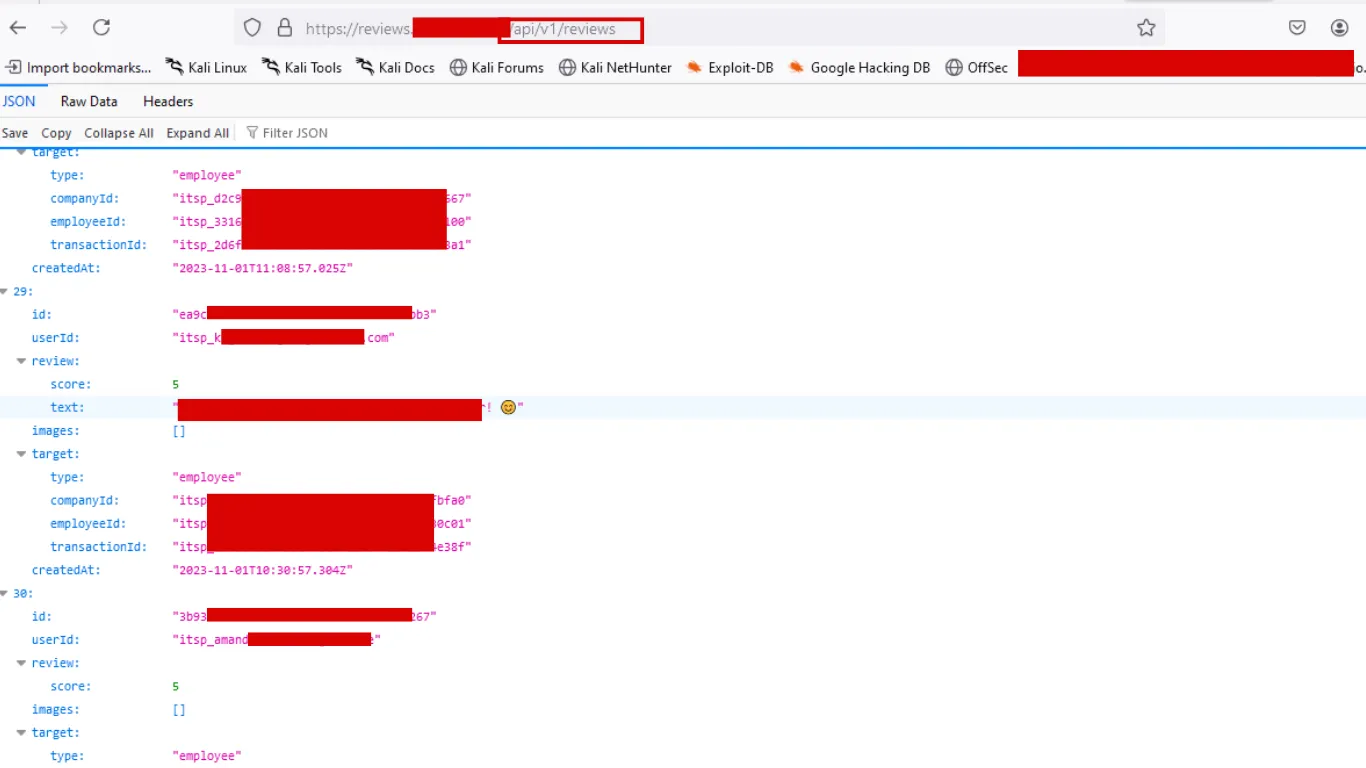
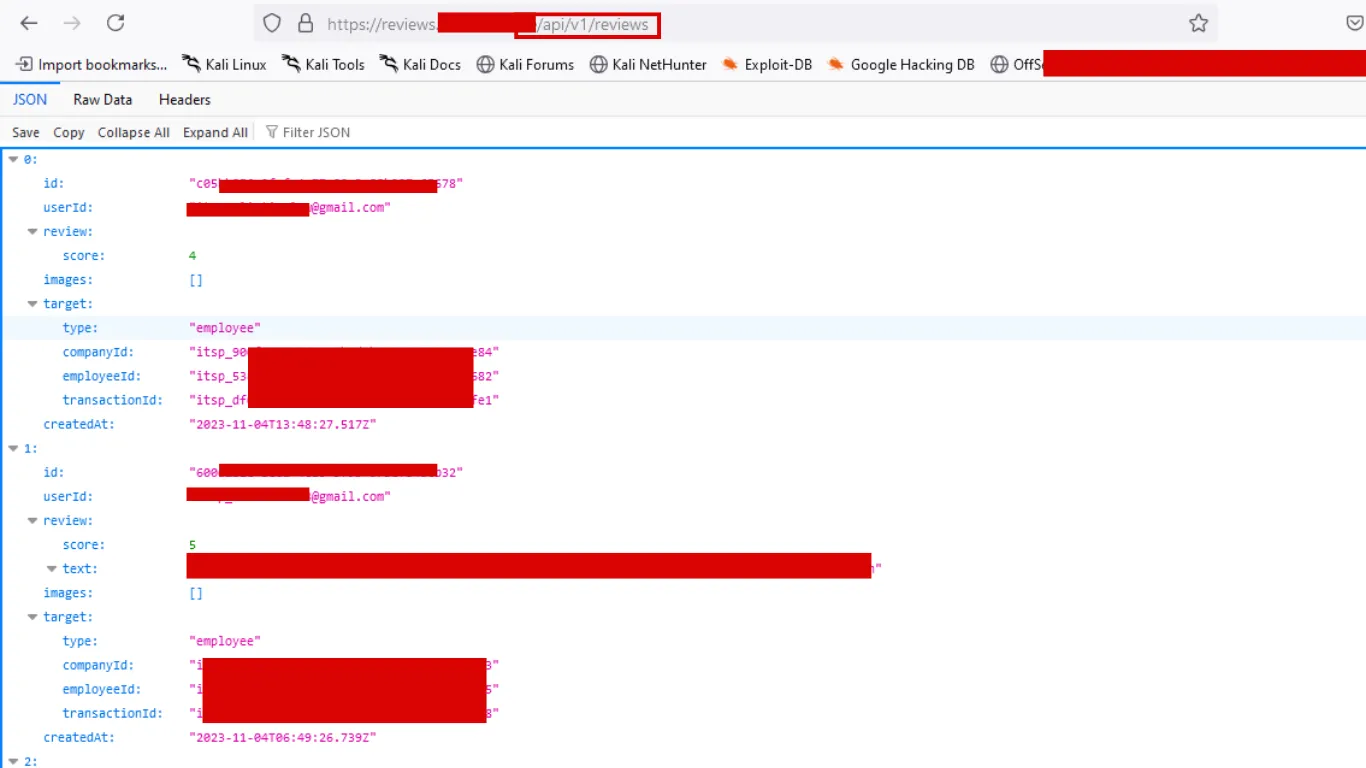
Excessive Data Exposure happens when the API returns more information than the frontend needs. Developers sometimes send full database objects to the client and trust the frontend to display only the safe fields.
For example, a review page may show only the reviewer's name and comment. But the API response may also contain the reviewer's email, phone number, internal user ID, and department code. The website hides these fields, but anyone intercepting the response sees them.
Mass Assignment happens when the API accepts more fields from the user than it should. Developers sometimes bind the full request body to the database object and forget to block sensitive fields.
For example, a profile update page may allow changing only name and phone number. But if the API also accepts role, isAdmin, isVerified, or accountBalance, the user may change values they should never control.
How to test:
- For data exposure: inspect every raw JSON response in Burp Suite. Look for fields like
email,phone,isAdmin,token,role,internalId - For mass assignment: add extra fields to request bodies. Try
"role": "admin","isVerified": true,"plan": "enterprise"and check whether the API accepts them
4.4 Broken Function Level Authorization
This happens when a user can perform an action that only another role should be allowed to perform. Unlike BOLA (accessing another user's data), this is about performing a function your role should not have.
A normal user should not be able to call admin endpoints that create users, delete accounts, approve payments, or export company data. This is effectively a form of privilege escalation. Even if the admin button is hidden from the UI, the API endpoint still needs server-side permission checks.
Testing approach:
- Map all endpoints and understand which actions belong to which role
- Capture a request from a higher-privilege account and replay it with a lower-privilege token
- Look for request fields like
role,isAdmin,type,privilege,accessLevel - The server should never trust the role sent by the client
4.5 Unrestricted Resource Consumption
This happens when an API allows users to consume excessive resources: memory, CPU, storage, bandwidth, or third-party service costs.
For example, a product API normally returns 20 results per page with limit=20. If you change it to limit=999999 and the server attempts to return everything, the API may slow down or crash. A PDF generation endpoint that accepts pageCount=99999 may consume all available memory.
Parameters to test: limit, pageSize, batchSize, count, quantity, width, height, duration, fileSize, pageCount.
Warning: many bug bounty programs do not allow denial-of-service testing. Always stay within scope and test carefully.
5. The OWASP API Top 10 explained
The OWASP API Security Top 10 is the industry-standard list of API security risks. The 2023 update reorganized several categories:
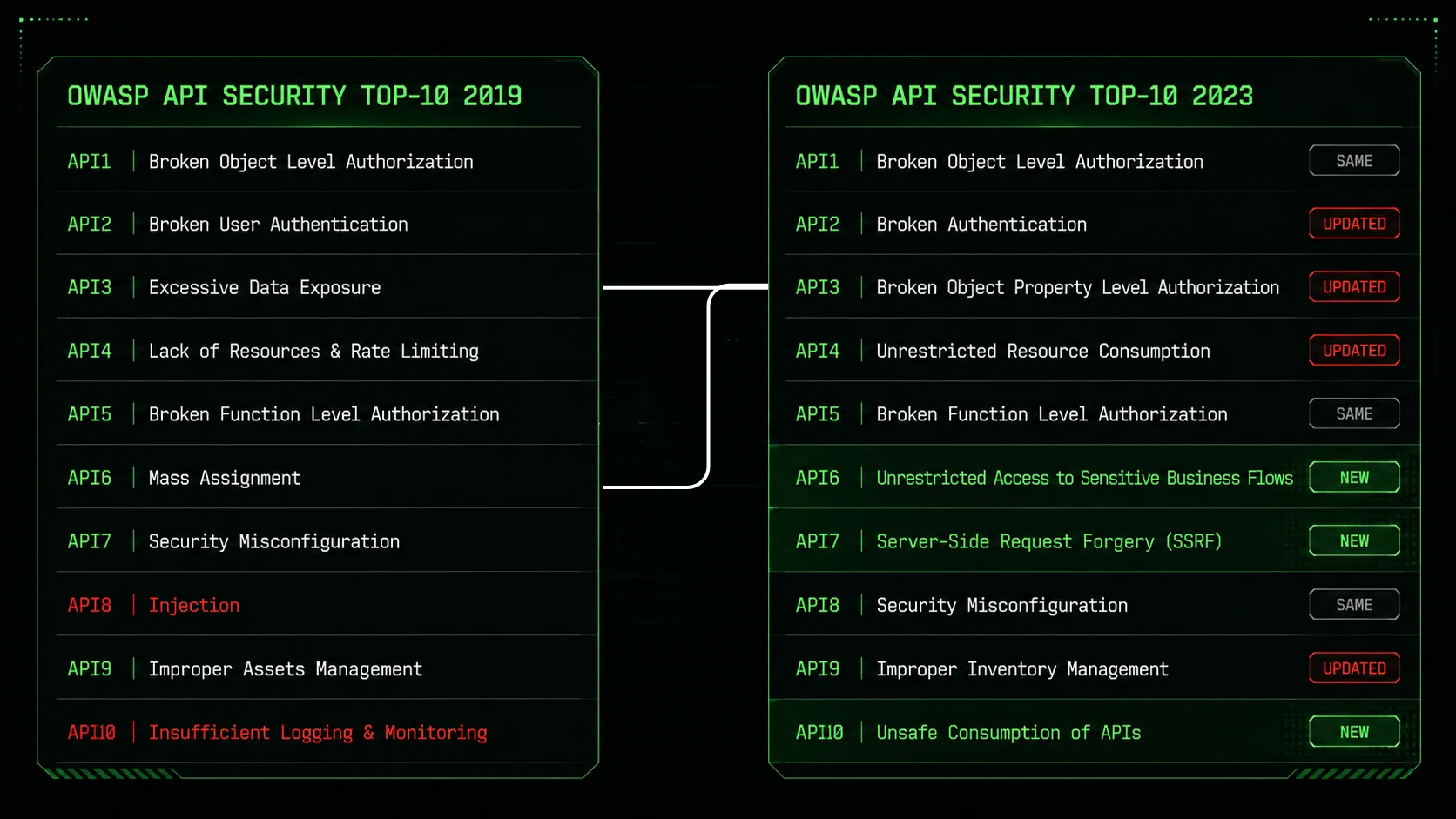
For beginners, focus on these first:
- API1 - Broken Object Level Authorization
- API2 - Broken Authentication
- API3 - Broken Object Property Level Authorization
- API4 - Unrestricted Resource Consumption
- API5 - Broken Function Level Authorization
The remaining five categories deserve attention as your API hacking skills grow:
- API6 - Unrestricted Access to Sensitive Business Flows: automated abuse of business logic (ticket scalping, mass account creation)
- API7 - Server-Side Request Forgery (SSRF): forcing the server to make requests to internal services via user-supplied URLs
- API8 - Security Misconfiguration: permissive CORS policies, verbose errors, missing TLS, exposed debug endpoints
- API9 - Improper Inventory Management: shadow APIs, old unpatched versions (always test
/api/v1/when/api/v2/exists), and exposed Swagger documentation - API10 - Unsafe Consumption of Third-Party APIs: trusting external API responses without validation
Beginners should first become strong in API1 through API5. Once you understand access control, authentication, data exposure, and resource limits through hands-on practice, the full list maps naturally to bugs you have already tested.
6. How to set up your first API testing lab
Never test random websites without permission. Unauthorized testing may violate laws like the Computer Fraud and Abuse Act (CFAA) in the United States, the Computer Misuse Act in the United Kingdom, or equivalent legislation in your jurisdiction. Use intentionally vulnerable labs first so you can learn without legal risk. For a complete environment walkthrough, see our cybersecurity home lab setup guide.
Step-by-step setup:
-
Install Burp Suite Community Edition. Set up the browser proxy, install the Burp CA certificate, and confirm you can capture HTTPS traffic. PortSwigger's Web Security Academy has a free walkthrough.
-
Deploy crAPI (Completely Ridiculous API). This OWASP project is built specifically for learning API security. It includes BOLA, broken authentication, excessive data exposure, and other vulnerabilities mapped to the API Top 10. This is the best starting point.
-
Try VAmPI. A simple vulnerable REST API for practicing authentication and authorization testing.
-
Move to DVGA. Once comfortable with REST APIs, this lab teaches GraphQL-specific problems like introspection abuse, query manipulation, and broken authorization in resolvers.
The practice method: open the lab, use it normally, and capture traffic in Burp Suite. Send requests to Repeater. Change IDs. Remove tokens. Change roles. Modify request bodies. Increase limits. Replay old tokens. Read every response.
Keep notes while practicing. Write down the endpoint, what you changed, what the server returned, and why the behavior is wrong. This habit directly translates to writing real bug reports and building your security portfolio.
7. The 8 essential API security testing tools
You do not need a hundred tools. In the beginning, understand a few deeply.
-
Burp Suite - Your primary tool. Intercept, modify, replay, and compare requests. Repeater is critical for testing one request with small changes.
-
Postman - Build API requests manually and organize them into collections. Useful when you know the endpoint and want a structured workflow.
-
jwt.io - Decode JWT tokens to see claims like user ID, role, expiry time, and issuer. Does not hack anything, but helps you understand what information the token carries.
-
ffuf - Fast web fuzzer for discovering hidden paths, endpoints, parameters, and values.
-
Gobuster - Directory and file discovery tool. Complements ffuf for broader scanning.
-
Kiterunner - API route discovery designed specifically for API paths. More API-aware than generic directory brute forcers.
-
gau / waybackurls - Collect old URLs from web archives to find historical API endpoints like
/api/or/graphql. -
Nmap - Discover open ports and services. Use it to find API services running on non-standard ports.
For network-level API traffic analysis, Wireshark is also useful, especially when debugging TLS and transport-layer issues.
Tools save time, but they do not replace thinking. Most good API bugs are found because the tester understands the logic, not because a tool printed a result.
8. How to find API endpoints
Before finding bugs, you need to find the API surface. This means discovering as many endpoints as possible.
Use the application. Log in, update your profile, upload a file, search for something, change settings, create an order, cancel it, invite a user, view notifications. Every action may generate an API request.
Review JavaScript files. Modern web apps store API paths inside JavaScript. Search for words like api, v1, v2, graphql, auth, token, upload, admin, payment, settings, internal.
Check for API documentation. Exposed Swagger UI or OpenAPI files reveal endpoints, parameters, request bodies, authentication requirements, and example responses. Finding exposed documentation can save hours.
Scan subdomains. APIs often live on subdomains like api.example.com, mobile.example.com, dev.example.com, or staging.example.com. Older or staging APIs frequently have weaker security.
Search web archives. Tools like gau and waybackurls reveal old endpoints that still exist on the server. GitHub searches can reveal API paths, documentation, or leaked keys in public repositories.
The goal is to build a complete map before testing deeply. If you do not know the endpoints, you do not know what to test.
Now that you understand what you are looking for, let us build the methodology to find your first real bug.
9. From API security labs to real bug bounty programs
Once comfortable with labs, start testing real programs. Do not rush this step.
Before testing:
- Read the program scope. Make sure API testing is allowed
- Check which domains and apps are in scope
- Verify whether automated scanning or DoS testing is restricted
- Understand the program's responsible disclosure expectations
Your starter methodology:
- Capture traffic and map all API endpoints
- Understand user roles and permissions
- Test object-level access (BOLA/IDOR)
- Inspect all API responses for excessive data
- Test authentication behavior (token expiry, logout, password reset)
- Check whether normal users can call admin functions
- Document everything as you go
Following this API security checklist for each target builds consistency. Your first valid report will teach you more than any course. Your first rejection will also teach you something. Rejections are part of bug bounty: sometimes the issue is not impactful enough, sometimes it is already known, sometimes your steps are not clear. Read the response, improve your method, and keep testing.
10. Practice resources and next steps
Hands-on practice and reading real reports should go together. Labs help you understand the bug. Real reports help you understand impact and reporting style.
Labs and courses:
- PortSwigger Web Security Academy - Free, comprehensive web security training with API-focused modules
- crAPI - OWASP's purpose-built API security lab
- VAmPI - Vulnerable REST API for auth testing
- Kontra - Interactive vulnerability explanations
- APIsec University - Dedicated API security courses
Books:
- Hacking APIs by Corey Ball - The definitive practical guide to API penetration testing
- Black Hat GraphQL by Nick Aleks and Dolev Farhi - Deep dive into GraphQL security
Read disclosed reports. Search HackerOne and Bugcrowd for reports tagged API, IDOR, BOLA, broken authentication, and excessive data exposure. Reading a few reports every week trains your pattern recognition.
Google dork examples for finding public reports:
site:hackerone.com/reports/* intext:APIsite:hackerone.com/reports/* intext:IDORsite:hackerone.com/reports/* intext:GraphQL
Your learning path:
If you are starting from zero, follow this sequence: learn HTTP and JSON, then Burp Suite. Practice on crAPI. Understand BOLA deeply. Move to broken authentication, excessive data exposure, function-level authorization, and resource limits. Read real reports. Start bug bounty programs. Validate your skills with beginner cybersecurity certifications to see where API security testing fits in the broader offensive security landscape.
Your first API bug may come from changing one ID, replaying one token, or noticing one hidden field in a JSON response. API security testing is not about memorizing payloads. It is about understanding trust and applying api security best practices at every layer. Can the API trust this user? Can it trust this ID? Can it trust this role value? Most API bugs happen when the server trusts something it should verify.
That is exactly why API penetration testing is such a powerful place to start your cybersecurity career.
Frequently asked questions
- What is API security testing?
- API security testing is the practice of evaluating Application Programming Interfaces for vulnerabilities that could allow unauthorized access, data exposure, or abuse. It involves intercepting API requests, modifying parameters like user IDs and role values, testing authentication and authorization controls, and checking whether the server properly validates every request. Unlike traditional web application testing that focuses on the browser interface, API security testing targets the underlying communication layer where most sensitive data flows.
- What are the most common API vulnerabilities?
- The five most common API vulnerabilities are Broken Object Level Authorization (BOLA/IDOR), where changing an object ID in a request exposes another user's data; Broken Authentication, including weak token handling and bypassable OTP systems; Broken Object Property Level Authorization, covering both excessive data exposure in responses and mass assignment in requests; Broken Function Level Authorization, where users can call endpoints restricted to higher privilege roles; and Unrestricted Resource Consumption, where APIs fail to limit request sizes or rates. These five categories account for the majority of real world API security findings.
- How do I start learning API security testing?
- Start by learning HTTP request and response structure, the difference between authentication and authorization, and how to use Burp Suite to intercept and modify API requests. Then set up crAPI, an intentionally vulnerable API lab from OWASP, and practice finding BOLA, broken authentication, and excessive data exposure bugs. Once comfortable, move to VAmPI for REST API practice and Damn Vulnerable GraphQL Application for GraphQL. Read disclosed bug reports on HackerOne to understand how researchers find and report real API vulnerabilities.
- Do I need programming skills for API security testing?
- You do not need programming skills to start API security testing. Most beginner-level API bugs are found by intercepting requests in Burp Suite and changing values like user IDs, role parameters, or token fields. However, basic familiarity with JSON format, HTTP methods (GET, POST, PUT, DELETE), and Bash or Python scripting will help you automate testing and understand API responses more quickly. JavaScript knowledge becomes useful when analyzing frontend code for hidden API endpoints.
- What tools do I need for API security testing?
- The essential starter toolkit includes Burp Suite Community Edition for intercepting and modifying API requests, Postman for building and organizing API requests manually, and jwt.io for decoding JWT tokens. For endpoint discovery, use ffuf or Gobuster for path fuzzing and gau or waybackurls for finding historical API paths. For GraphQL APIs, add InQL and GraphQL Voyager later. Start with Burp Suite alone and add tools as your methodology matures.

Bug Bounty Mentor at Unihackers
Author of CVE-2025-56697 · Recognised by WHO, UNESCO, BBC, Cambridge and Boeing
Parth has hacked WHO, UNESCO, BBC, Boeing, Cambridge, Sheffield, Deutsche Börse, BASF, Michelin and Philips, legally, and has the 250+ Hall of Fame entries to prove it. He authored CVE-2025-56697 (a Stored XSS published on NIST's National Vulnerability Database), founded ScriptJacker LLP and ranked 21st out of 10,000 at HackWithIndia 2026. At Unihackers he teaches the only thing recruiters actually pay for in offensive security: how to find a real bug, write a clean report and get paid for it. CEH v13, eJPTv2 and eWPTXv3.
View ProfileReady to Start Your Cybersecurity Career?
Join hundreds of professionals who've transitioned into cybersecurity with our hands-on bootcamp.