How to Choose Your First Bug Bounty Target: The 3-Filter System

Most beginners quit bug bounty because they pick the wrong target. Learn the 3-Filter System (scope size, tech stack, hunter density) to choose a target you can actually find bugs on.
- Offense
- Pentesting
- Skills
- Bug Bounty
- Beginners
Key facts
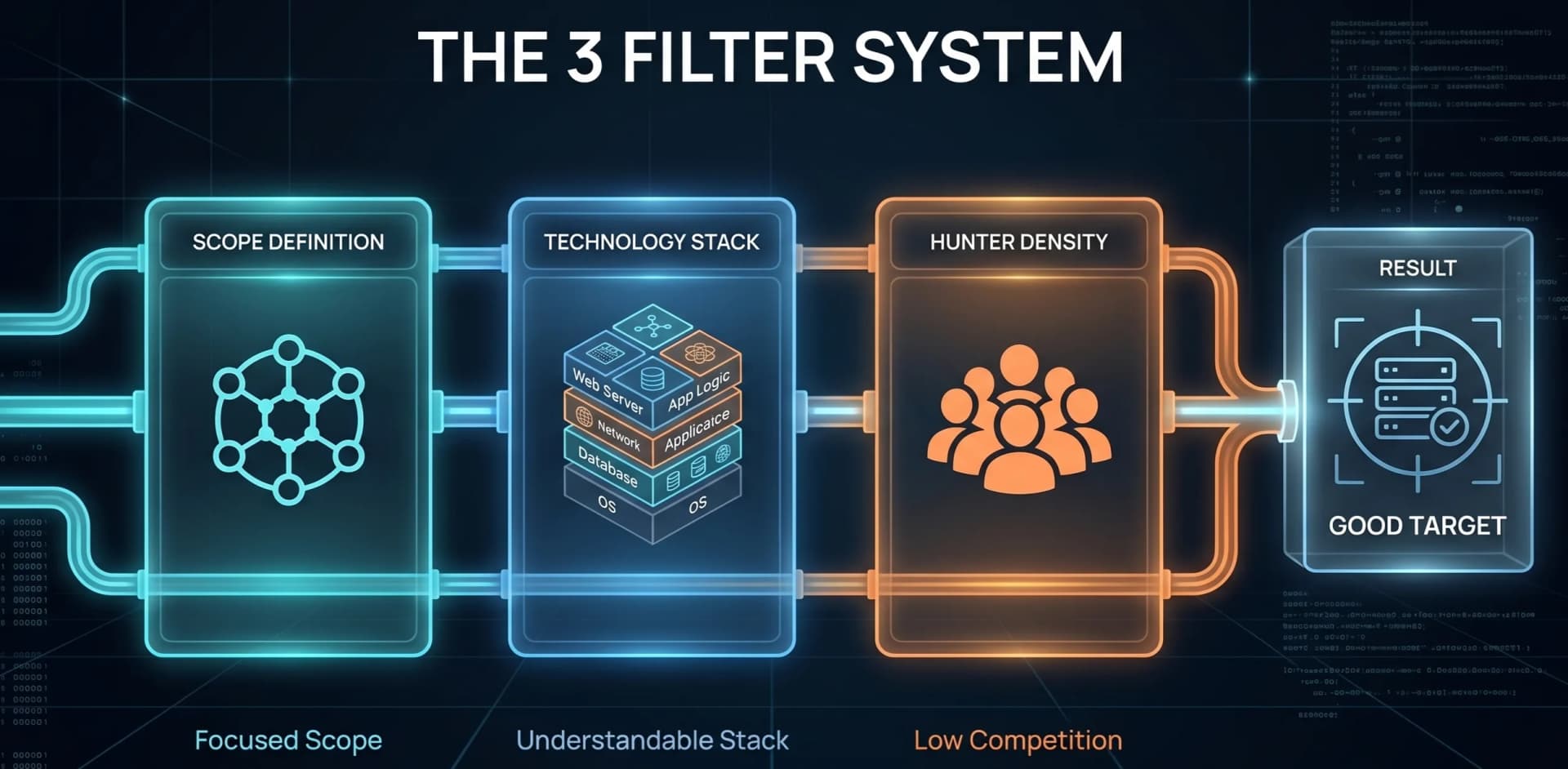
- Bug bounty target selection can be reduced to three filters: scope size, technology stack, and hunter density. A target that fails any one of the three is a poor choice for a beginner regardless of its bounty size.
- Broken Object Level Authorization (BOLA/IDOR) has held the number one position on the OWASP API Security Top 10 since the list was first published in 2019, making access-control bugs the highest-probability find for beginners.
- The security.txt standard (RFC 9116) lets organizations publish a machine-readable file at /.well-known/security.txt that points researchers to their vulnerability disclosure contact, making it a reliable way to find low-competition programs.
- Vulnerability Disclosure Programs (VDPs) typically reward recognition such as Hall of Fame listings rather than cash, and attract far fewer researchers than paid programs on major platforms, which lowers duplicate rates for beginners.
- Business logic vulnerabilities such as IDORs, race conditions, and price manipulation are found by testers who understand one application deeply, not by testers who scan thousands of subdomains shallowly.
TL;DR
Most beginners do not quit bug bounty because they lack skills. They quit because they pick the wrong target. Target selection is a learnable skill, and it is more important than knowing every payload. Run every program through three filters before you spend one hour on it:
- Scope Size. Pick a target you can fully map in under 30 minutes.
- Technology Stack. Hunt the technologies you already understand.
- Hunter Density. Choose programs where you compete against five hunters, not five thousand.
Then run a 2-hour recon checklist, score the target out of 30, and commit to one target for four weeks. That is how you reach the deep understanding where real bugs live.
Target selection is the skill nobody teaches
Here is the truth no one tells you. Most beginners do not quit bug bounty because they are not smart enough. They quit because they open a program with a massive scope, spend weeks running automated scanners, find nothing, and assume they are not good enough for this field.
Target selection is a skill. It is more important than knowing every XSS payload. It is more important than having twenty tools installed. When you choose a target that matches your current level, you find bugs. When you choose a target that is too big, too complex, or too crowded, you burn out.
I learned this the hard way. Early in my career I would hunt anything with a bounty attached. I wasted months on targets that were too big, too complex, or too crowded. Once I started filtering targets before testing them, my results changed immediately. That discipline is how I reached 250+ Hall of Fame entries from organizations including the WHO, UNESCO, BBC, Boeing, Cambridge, Sheffield, Deutsche Börse, BASF, Michelin, and Philips.
This guide turns that discipline into a simple, repeatable system. The 3-Filter System is not complicated and it does not require advanced tools. It just requires honesty about where you are right now as a hunter. Run every potential target through these three checks. If a target fails any check, drop it and find another one.
1. Filter 1: Scope Size (can you map it in 30 minutes?)
For your first ten bugs, pick a scope that fits on one screen. Avoid wildcard scopes like *.target.com when you are beginning. Look for focused scopes such as api.target.com, dashboard.target.com, or specific endpoints and subdomains listed in the policy.
Why scope size decides your odds
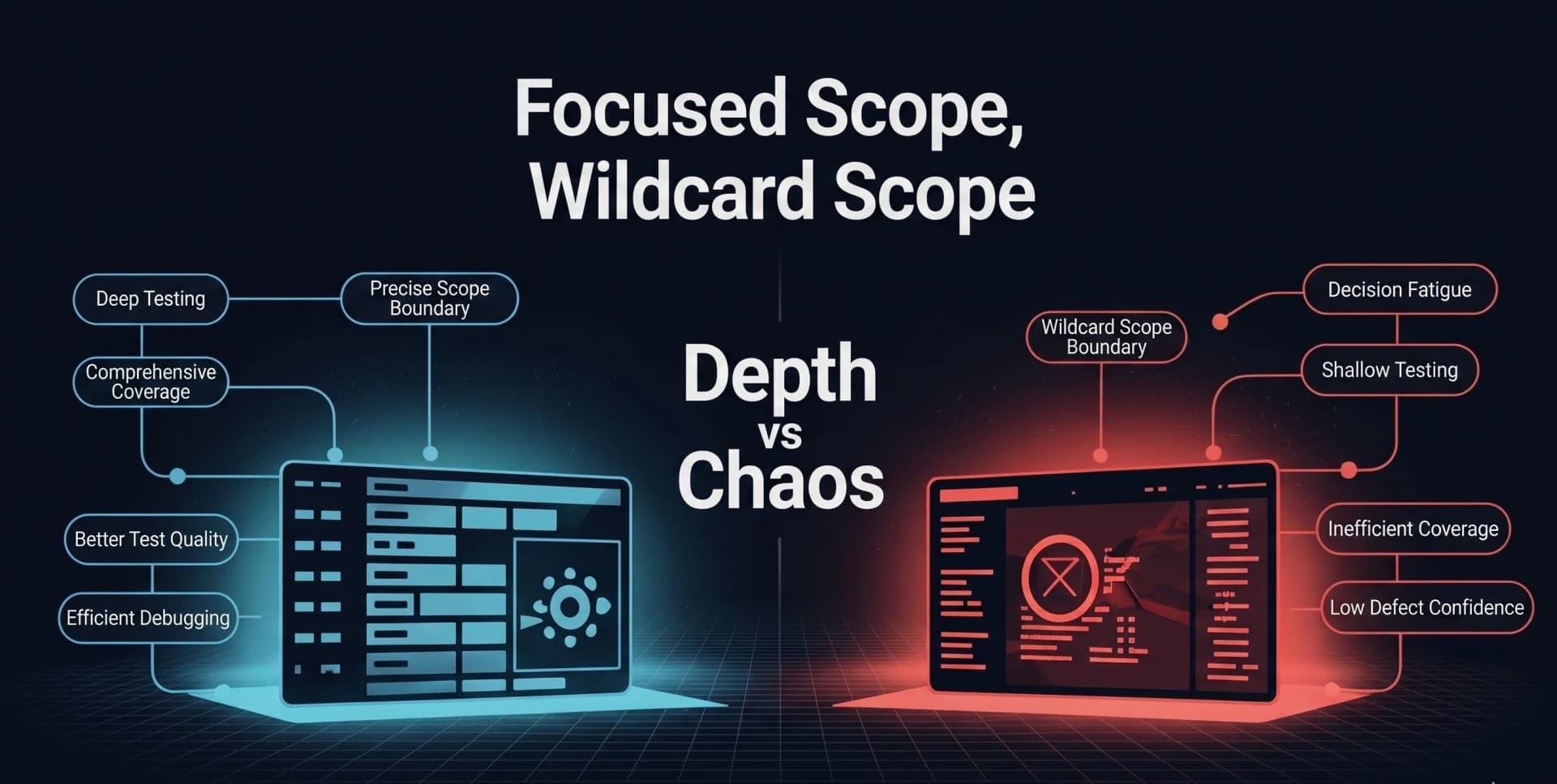
A wildcard scope is a trap for beginners. You will spend two weeks mapping thousands of subdomains. You will find an old server, get excited, and then learn that someone reported it two days ago using automation. You just spent eighty hours to learn that another hunter is faster than you.
Large scopes also create decision fatigue. When you have ten thousand subdomains, you never develop deep understanding of any single application. You jump from asset to asset. But logic bugs live in deep understanding. IDORs, race conditions, and price manipulation are found by testers who understand the business flow better than the developers do.
Think about it this way. If someone asked you to find a mistake in a single chapter of a book, you could do it in an hour. If they asked you to find a mistake somewhere in an entire library, you would wander for days and probably miss it. That is exactly what happens when beginners hunt wildcard scopes. The bug is there, but you are looking in too many places at once.
A focused scope forces you to understand every feature. You learn how users register, how orders flow, how payments process, and how files are shared. That is where the real bugs hide. When you know every endpoint by heart, you start to notice the weird behaviors: one parameter that changes behavior when you modify it, one endpoint that does not check permissions properly. Those moments only happen when you know the application deeply.
What this looks like in the real world
A security researcher shared his experience on Reddit after eight months of failure. He was a web developer with solid technical knowledge. Every time he started hunting, he would list all subdomains for a major target and then randomly browse through them. He used subdomain enumeration tools, crawlers, and archive URL fetchers. After finding endpoints, he did not know what to do next. He wrote that it felt like he would have to spend a whole year just to find one tiny bug. He was hunting massive scopes on popular programs without a plan, and the size of the target overwhelmed him completely. You can read the thread here: Bug bounty is insanely hard. Am I doing something wrong?
Another hunter wrote about the mistake that slowed his progress for months. He chased huge programs with wide scopes, switched targets every few days, and never committed to understanding one application deeply. Once he focused on smaller, manageable scopes, his results changed immediately: The Bug Hunting Mistake That Slowed My Progress.
Scopes that are ideal for beginners
api.target.comormobile.target.comwith fewer subdomains and assets- Specific endpoints like
/api/v1/usersor/api/v1/orders - Single applications with clear user roles
- Online stores with cart and checkout flows
The rule: if you cannot read every endpoint in the scope within thirty minutes, the target is too big. Skip it.
2. Filter 2: Technology Stack (hunt what you understand)
Pick targets where you understand the logic and the protocol. If you have never touched GraphQL, do not pick a target whose entire API is GraphQL native. If you do not understand mobile applications, skip mobile scopes for now. You can learn those technologies later, but they are not where you start. Hunt what you know.
Why a tech mismatch kills motivation
When you pick a target built on technology you do not understand, you spend your first week learning syntax instead of finding bugs. You spend your second week struggling with concepts. By week three, you are frustrated and ready to quit.
Beginners often chase high bounties on hard targets. A $50,000 maximum payout means nothing if the application runs on a stack you cannot test. Facebook, Google, and Apple have world-class security and have been tested by the best hunters for over a decade. As a beginner, you are likely to spend a hundred hours and find nothing.
Compare that to a hunter who understood REST APIs and standard web forms and found a price manipulation bug on a simple PHP site. The checkout API was a basic POST request. No microservices, no complex architecture, just a price parameter sent from the client side. He changed the price from five hundred dollars to two dollars, and the server accepted it. That bug required zero exploit code and no special payloads. It just required understanding a simple POST request and asking why the price was coming from the client. That is a classic business logic vulnerability, and it is exactly the kind of bug you can find when your mind is free to look for logic flaws instead of fighting the basics.
Real case: the GraphQL barrier
A beginner shared his first-bounty story publicly. He found a JavaScript file containing a GraphQL API key on a target with a massive scope, and discovered a /graphql endpoint through directory fuzzing. But there was one problem: he did not know anything about GraphQL. He spent several days researching, learning, and collecting tools just to understand the schema. He used PortSwigger Academy to learn the basics and the InQL Burp extension to visualize the schema. He eventually earned a $700 bounty, but the technology gap almost made him quit before he started. If he had picked a standard REST API target, he could have started testing immediately. Full story: How I Got My First Bounty.
Beginner-friendly stacks
- Standard REST APIs with clear GET and POST endpoints (see our API security testing guide)
- Traditional web apps with user roles like Admin, User, and Guest
- Ecommerce flows with cart, checkout, and payment steps
- Platforms with team or invitation features
Stacks to avoid as a beginner
- Heavy WebSocket reliance. Hard to test without custom tooling.
- GraphQL with complex authorization. Steep learning curve.
- Internet of Things or hardware scopes. Requires physical devices.
- Blockchain or smart contract scopes. A completely different skill set.
If you are still building the fundamentals, spend time in a home lab and the PortSwigger Web Security Academy first. Both let you practice on the stacks above with zero legal risk.
3. Filter 3: Hunter Density (avoid the crowd)
Find programs where competition is low but the scope is real. Avoid the rush on popular programs. Look for vulnerability disclosure programs with small Hall of Fame lists, and newer programs that have not been picked clean yet.
Why density is a hidden multiplier
High hunter density means low odds. When five thousand hunters are looking at the same target, your chance of finding a new bug drops to almost zero. The easy bugs were found on day one. The medium bugs were found in week one. What remains requires deep expertise or very specific conditions.
Popular programs on major platforms are like crowded fishing spots. Everyone casts lines, and the big catches are rare. On the most saturated programs, a large share of incoming reports are closed as duplicates, which means even a valid finding can earn you nothing.
Hidden programs are your secret weapon. Some of the best targets for beginners are not on the HackerOne or Bugcrowd front pages. They are responsible disclosure programs buried in a company's security page, or self-hosted through a security.txt file on the company website. These programs may not pay cash, but they provide Hall of Fame entries, swag, reputation, and experience. Most importantly, they have very little competition. A company running a VDP through its own website might have only five or ten hunters who have ever reported to it. Compare that to a flagship program with five thousand hunters. Where would you rather spend your two weeks?
Real case: twelve names on the Hall of Fame
One hunter earned his first $1,000 bounty by avoiding the crowd entirely. Instead of jumping to a popular program, he picked a mature public program and, after nearly two months, revisited his notes and checked robots.txt again. He found a disallowed path pointing to an admin panel that returned a 403, which confirmed the resource existed, and then found a way to bypass the restriction. The key detail is that he chose a focused, low-competition target, which let him spend time on details like robots.txt without worrying that five hundred other hunters had already checked them: My First Bug Bounty: How I Earned $1,000.
Another researcher found a fintech VDP with exactly twelve names on the Hall of Fame and a scope of just two APIs. Because competition was so low, he tested every feature deeply for two weeks and found three valid bugs in secondary features that other hunters had skipped. On a program with five hundred active hunters, those bugs would have been gone in the first week.
How to measure hunter density
- Check the Hall of Fame page. If it has 200+ names, the program is saturated. Ten to fifty names means you have room to work.
- Look at program age. A program launched six months ago with three hundred resolved reports is likely picked clean. A program launched three weeks ago with five reports is fresh.
- Check last activity. If the last resolved report was yesterday, hunters are actively working it. If the last report was three weeks ago, hunters have moved on but the bugs may still be there.
Finding hidden programs with Google dorks
Google dorking uses advanced search operators to surface low-competition programs:
site:com inurl:responsible-disclosure
site:de inurl:security.txt
inurl:.well-known/security.txt "contact"
site:io "report a vulnerability"
When you find a security.txt file (standardized as RFC 9116), read it carefully. If it lists a contact and an acknowledgments page, you have found a target with virtually no competition.
4. Run a 2-hour recon checklist before you test
Once a target passes all three filters, do not start firing payloads. Spend two hours on structured reconnaissance. If you cannot answer these questions in 120 minutes, the target is too complex or your notes need work.
Hour 1: map the attack surface
Your goal in the first hour is to understand the whole attack surface, not to find bugs yet.
- Register two accounts. You need two accounts to test for IDORs and other access-control issues.
- Identify all user roles. Guest, User, Admin, Vendor. Can one escalate to another?
- List every feature. Login, password reset, profile update, file upload, sharing, checkout.
- Find the API documentation. Look for Swagger or Postman collections, or read the frontend JavaScript calls.
Hour 2: probe for low-hanging fruit
- Password reset flow. Is the token predictable? Can you brute force it?
- File upload. Is there extension filtering? Can you upload HTML or JavaScript?
- Profile update. Can you change your email to an existing user's email?
- Sharing or invitation flows. Can you invite yourself to another user's resource?
- Checkout or payment flow. Is the final price sent from the client?
If you finish this checklist and find nothing, do not quit. You have only tested the surface. But if you find even one weird behavior, like a 200 OK on a modified ID or a missing rate limit, you have a lead. Follow that lead. New to recon tooling? Start with our Nmap tutorial and essential Linux commands.
5. Score every target with the Target Scorecard
Use this scorecard for every target before you spend one hour on it. It takes five minutes and it will save you from weeks of wasted effort.
| Criteria | Out of | Your score |
|---|---|---|
| Scope size: can I read all endpoints in 30 minutes? | 5 | |
| Features: are there user roles, sharing, payments, uploads? | 5 | |
| Tech stack: do I understand the framework? | 5 | |
| Hunter density: is the Hall of Fame under 50 names? | 5 | |
| Program age: launched under 6 months ago? | 5 | |
| Platform: is it a VDP or low-competition program? | 5 | |
| Total | 30 |
Scoring guide:
- 25 to 30: Prime target. Commit four weeks.
- 18 to 24: Acceptable. Good for learning, but manage expectations.
- Below 18: Drop it. Find something better. Your time is too valuable.
Keep this scorecard in your notes and run it before every new target.
6. Commit to one target for four weeks
Once a target passes the filters and clears the scorecard, commit to it for four weeks. Do not add a second target until you have spent four full weeks on the first one.
Most beginners are target tourists. They hunt a program for three days, find nothing, and switch to the next one. They never develop the deep understanding required to find logic flaws. And logic bugs do not reveal themselves on day three. They reveal themselves on day ten, when you notice the delete-account endpoint behaves differently if you send it twice. They reveal themselves on day twenty, when you realize the mobile API has a parameter the web app never uses. They reveal themselves on day thirty, when you understand the business flow better than the developer.
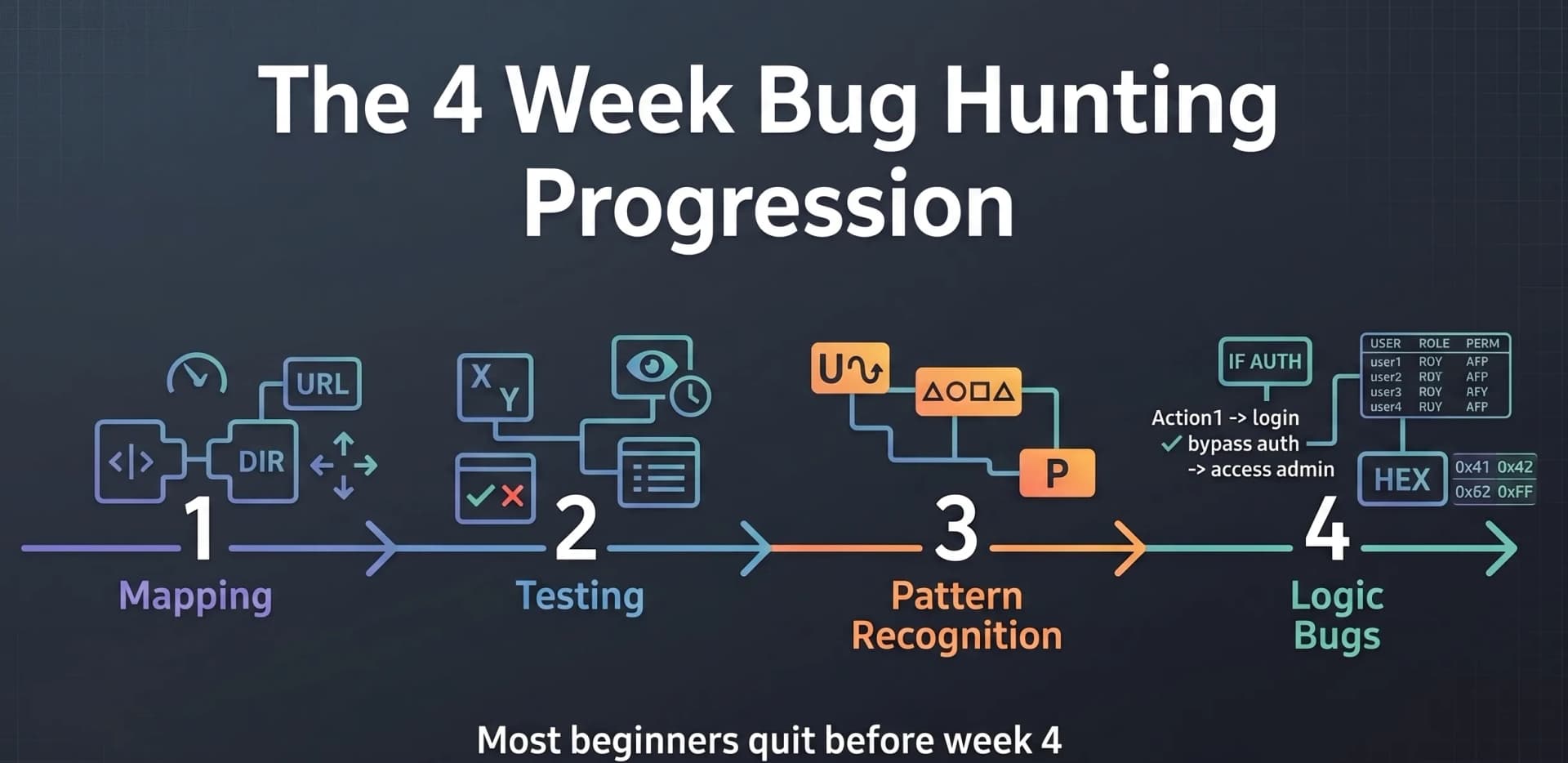
This discipline is uncomfortable. It feels slow. But it is how you build the pattern recognition that makes hunting feel effortless later. If you find no bug in four weeks, review your notes before you move on. Did you miss a feature? Did you skip a flow? Only then consider switching.
7. Where bug bounty fits in your wider career
Bug bounty is one of the fastest ways to prove offensive-security skill in public, but it is rarely the whole story. The same target-selection discipline (focus, depth, and patience) is what employers look for in penetration testers and red teamers. If you are building a career, pair your hunting with structured learning: a clear cybersecurity career path, the right beginner certifications, and proof that you can work safely, which you build in a cybersecurity home lab. Switching fields with no formal background? See how people break in with no degree.
Read disclosed reports every week to train your pattern recognition. The PortSwigger Web Security Academy and the OWASP project pages are free, authoritative, and map directly to the bugs you will hunt.
Conclusion: stack the odds in your favor
Bug bounty is not a lottery. It is about stacking the odds in your favor.
You do not need to hack Google to be a real hacker. You need to find a target that fits your current skills, understand it deeply, and hunt where others are not looking. The 3-Filter System turns random guessing into a process. Scope Size keeps you focused. Technology Stack keeps you effective. Hunter Density keeps you competitive.
Your first Hall of Fame entry is hiding in a focused API, on a program with twelve other hunters, in a business logic flow that nobody else thought to test. Use the filters. Use the scorecard. Commit four weeks. Go find it.
Frequently asked questions
- How do I choose my first bug bounty target as a beginner?
- Run every program through three filters before you start. Scope Size: pick a target small enough that you can read every endpoint in under 30 minutes, and avoid wildcard scopes like *.target.com. Technology Stack: choose technologies you already understand, such as standard REST APIs and traditional web apps, and skip GraphQL, mobile, IoT, and blockchain until later. Hunter Density: prefer vulnerability disclosure programs and newer programs with small Hall of Fame lists over crowded flagship programs. If a target fails any of the three filters, drop it and find another one.
- What is a good scope size for a beginner bug bounty hunter?
- A good beginner scope is one you can fully map in 30 minutes or less. That usually means a single focused asset such as api.target.com or dashboard.target.com, a specific set of endpoints like /api/v1/users and /api/v1/orders, or one application with clear user roles. Avoid wildcard scopes such as *.target.com when you are starting, because you will spend weeks enumerating subdomains and competing against automation instead of learning one application deeply.
- Should beginners hunt on HackerOne and Bugcrowd or smaller programs?
- Beginners usually find their first valid bug faster on smaller, lower-competition programs than on crowded flagship programs. The easy bugs on popular programs were found on day one, and duplicate rates are high. Vulnerability disclosure programs, newer programs with short Hall of Fame lists, and self-hosted security.txt programs give you room to test deeply without racing hundreds of other hunters. You can still use the major platforms, but pick the quieter programs inside them.
- How long should I spend on one bug bounty target?
- Commit to one target for four weeks once it passes the three filters. Logic bugs rarely appear in the first few days. They show up around day ten, twenty, and thirty, once you understand the business flow better than the developer. Most beginners are target tourists who switch programs every few days and never reach that depth. If you find nothing in four weeks, review your notes for a missed feature or flow before you move on.
- Do I need advanced tools to start bug bounty hunting?
- No. Most beginner-friendly bugs are access-control and logic flaws found by reading requests carefully and changing small values, not by running large toolchains. You need an intercepting proxy such as Burp Suite, two test accounts to compare access, and a habit of taking notes. Target selection, deep understanding of one application, and persistence matter far more than the number of tools you have installed.

Bug Bounty Mentor at Unihackers
Author of CVE-2025-56697 · Recognised by WHO, UNESCO, BBC, Cambridge and Boeing
Parth has hacked WHO, UNESCO, BBC, Boeing, Cambridge, Sheffield, Deutsche Börse, BASF, Michelin and Philips, legally, and has the 250+ Hall of Fame entries to prove it. He authored CVE-2025-56697 (a Stored XSS published on NIST's National Vulnerability Database), founded ScriptJacker LLP and ranked 21st out of 10,000 at HackWithIndia 2026. At Unihackers he teaches the only thing recruiters actually pay for in offensive security: how to find a real bug, write a clean report and get paid for it. CEH v13, eJPTv2 and eWPTXv3.
View ProfileReady to Start Your Cybersecurity Career?
Join hundreds of professionals who've transitioned into cybersecurity with our hands-on bootcamp.